
Home / Church Livestreaming / Operator Path
Operator Path · Lesson 1 of 15
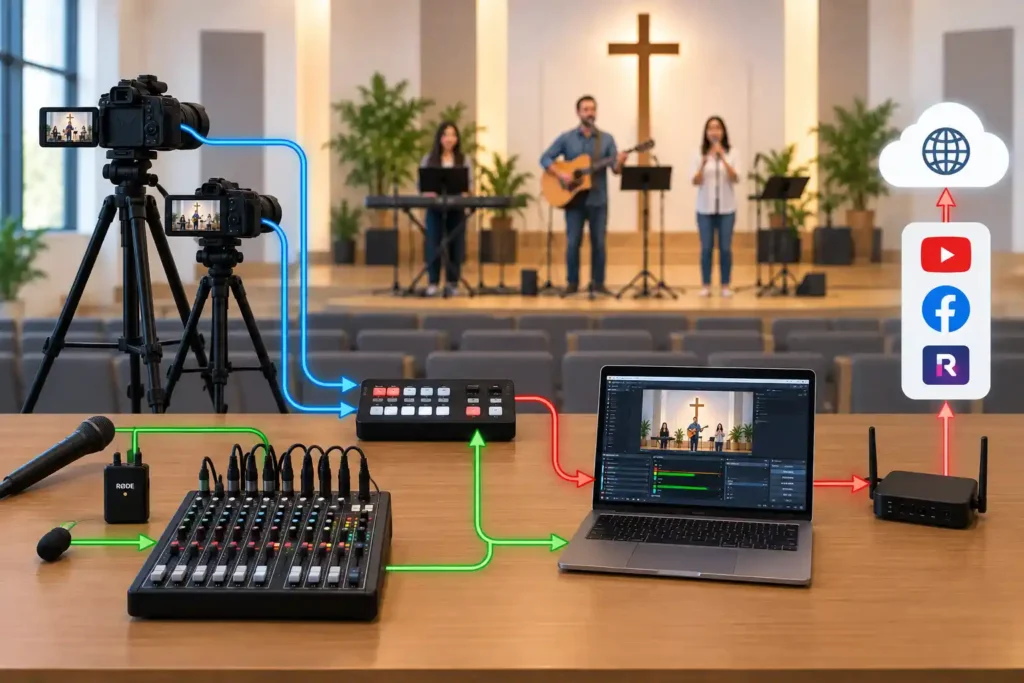
When a livestream starts on Sunday, it looks to the viewer like everything happens with a single click: the picture just appears on YouTube. From the operator’s side, though, several separate parts sit in between, each doing its own job before passing the signal to the next. Understanding the whole chain step by step makes it much easier to find where a problem most likely sits when something doesn’t behave as expected. This article walks through that chain, from camera to viewer’s screen.
The chain, step by step
In this course, the video signal passes through five points: from the camera along a cable to a capture device, from there to a computer, from the computer’s software — called OBS — through the internet to YouTube, and finally from YouTube to the viewer’s own device. Each point changes the signal a little: the camera produces a raw picture, the capture device converts it into a form the computer understands, OBS combines it with audio and any on-screen text, and YouTube compresses and distributes the result to every viewer at once.
This article focuses on the first part of the chain — from camera to OBS — because that is where the cabling and equipment decisions are made that determine whether the rest of the chain works reliably. What OBS does internally, and how a YouTube stream is actually published, are covered in the next two articles.
From camera to capture device: why a cable beats a wireless link
The connection between camera and computer is the first link in the chain, and also one of the most sensitive, because it is the only part physically tied to where the camera stands. In this course, that connection is always built with a cable whenever practically possible — not wirelessly.
The reason isn’t that wireless technology is bad in itself. The reason is predictability. A cable connection either works or it doesn’t, and if it doesn’t, the fault is usually found quickly and mechanically: a loose connector, a broken cable. A wireless connection, by contrast, can run flawlessly for weeks and then start dropping out for no obvious reason — for example, when someone brings in a new device using the same frequency, or the room is fuller than it was during rehearsal. For a small volunteer team running a stream 40–50 times a year without dedicated technical support, a predictable fault is easier to manage than a random one.
Consider a situation where the stream stops mid-hymn because a poorly seated cable connector works loose as the camera shifts slightly on its mount. The screen goes black for a few seconds until the operator notices and reconnects it. The fault isn’t in the camera or the software, but in a simple mechanical point — exactly the kind of thing that’s easy to check in advance once you know where to look.
What a capture device is, and why its quality matters
A camera can’t send its picture directly to a computer’s software — its video output and the computer’s inputs speak different languages. The capture device is the point that receives the camera’s video signal and converts it into a form the computer and its software can recognize directly.
The quality of the capture device matters more than its size or price suggests. Some of the cheapest models need their own driver software — a small background program that has to be installed separately and can be unstable. The most reliable capture devices are the ones the computer recognizes directly, without a separate driver: they are simply more dependable, because the chain has one fewer possible point of failure.
Consider a situation where a church adopts the cheapest capture device it can find, one that requires its own driver software. The driver crashes at random every few weeks, and each crash briefly stops the stream, even though the camera and computer keep working perfectly the whole time. Switching to a device the computer recognizes directly, without a driver, removes the problem entirely.
Why the computer is part of the chain
The simplest possible setup would send the camera’s picture straight to the internet with no computer in between — some modern cameras and phones can already do this on their own. In this course, though, the computer is deliberately part of the chain, not an unnecessary extra step.
The computer is where the signals come together. OBS, running on it, receives the picture from the capture device and the audio separately from the mixer, combines them into a single stream, and sends the result onward. When a second camera, on-screen song lyrics, or a speaker’s name as text are added later, all of it happens on the same computer — none of it would be possible straight from the camera without one. The computer, then, is a requirement for the growth path ahead, not overkill for today’s needs.
The most common points of failure
Once you understand the chain as a whole, it’s much easier to guess quickly where a problem is most likely to be. The most common points of failure are:
- cable connections between camera and capture device (a loose or damaged cable);
- the computer recognizing the capture device (especially if it needs its own driver);
- the computer and OBS working correctly (for example, the software left in the wrong state from last time);
- the internet connection at the venue (a slow or unstable connection shows up to viewers as dropouts, even if everything else works flawlessly).
This list isn’t random. It follows the order of the chain — when something isn’t working, check in exactly this order, starting from the camera, rather than at random.
Why the chain is deliberately simple
Video signal could, in theory, also travel over a data network between multiple devices without a dedicated cable for each one. This course, however, does not choose that as the default solution. Network-based video requires a carefully configured network and ongoing maintenance — expertise a small volunteer team usually doesn’t have, and shouldn’t need as a requirement for this system. A direct cable connection from camera to capture device is simpler to build, easier to explain to a new volunteer, and easier to troubleshoot when something goes wrong mid-stream.
What to Remember
- The video signal passes through five points: camera → capture device → computer (OBS) → YouTube → viewer’s device.
- A cable connection is always the first choice over wireless between the camera and the computer in this course, because its failures are more predictable than a wireless link’s.
- The capture device converts the camera’s video signal into a form the computer understands — a device that works without a separate driver is generally the more reliable choice.
- The computer is part of the chain because it combines picture and sound and enables later additions, such as a second camera or on-screen text.
- Knowing the order of the chain in advance makes troubleshooting, during or after a stream, considerably faster.