
Home / Church Livestreaming / Operator Path
Operator Path · Lesson 9 of 15
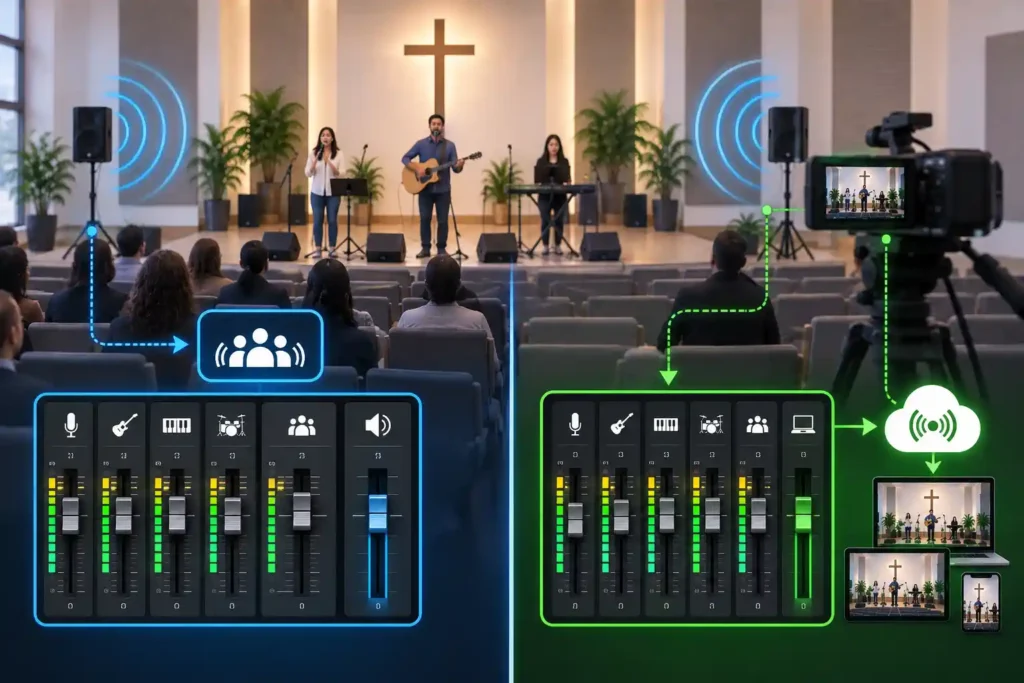
A church’s audio mixer is designed to serve the person sitting in the room. A stream viewer hears the same service in a completely different situation, though — through a laptop or phone speaker, without the natural balance the room itself provides. When you try to serve both listeners with the same, unaltered audio signal, one of them loses out. This article explains where in the mixer the stream audio should actually be taken from, and why this single choice matters more than any individual piece of equipment.
Why the same audio doesn't suit both listeners
The main job of an audio mixer is to produce good sound for the room’s PA speakers. The sound engineer — or the volunteer filling that role — constantly adjusts levels, bass, and overall volume to match what the room and the moment call for. During worship music, the sound is often meant to be fuller and louder than during speech. That’s correct for the room. It isn’t the same thing, though, as sound that works well from a small speaker in a viewer’s home.
If the stream receives exactly the same signal as the PA speakers, every adjustment made for the room — including sudden volume changes — travels straight through to the viewer as well.
The core principle: a separate, adjustable output, not the mixer's main output
This course recommends taking the stream audio from the mixer’s aux output — the mixer’s own separate auxiliary output, which can be adjusted independently of the room sound — whenever one is available. This is a strong general principle, not an absolute rule: the Main L/R output, which feeds the PA amplifier directly, follows the room mix with no adjustment of its own, while an aux output is a separate, independently adjustable signal. If the mixer has no free, separate output available, Main L/R may be the only option — and in that case, it’s a deliberate compromise, where the stream audio follows the room’s settings, rather than a mistake.
“Control room” is not automatically the same thing as aux. On many mixers, especially small analog ones, the control room control is a listening-level control that plays back the Main mix at a different volume — it is not an independently mixable bus. On a digital mixer, control room may be its own monitoring path, but even that behavior isn’t consistent across models. It’s worth checking your own mixer’s manual to see whether it actually offers a genuinely separate, channel-adjustable aux or matrix output, before assuming a control room output will be enough.
Consider a situation where worship music begins and the volunteer running sound deliberately raises the room volume so the congregation experiences the music more fully. If the stream were connected to the Main output, every adjustment made for the room — including a sudden volume increase as the worship set begins — would travel straight through to the viewer, without anyone having made that decision for the stream.
Two starting points: analog and digital mixers
The practical setup depends on what kind of mixer the church has.
On an analog mixer, the aux output is a line-level signal — it has already been amplified to sending level, and it doesn’t need a microphone preamp or phantom power. This output is connected by cable to the line input of an audio interface attached to the computer, and the interface’s only job is to convert the analog signal into a digital one for the computer. If this line-level signal were instead connected to the computer’s or interface’s microphone input, the difference would be audible: a microphone input is designed for a much weaker signal than a line input — typically hundreds of times weaker. When an already-amplified line-level signal is fed straight into a microphone input, it overloads the preamp and produces audible distortion. This is why the correct connection point — line input, not microphone input — is what matters, not just the physical connector on the cable.
On a digital mixer, the situation is often simpler: many models have a built-in USB audio interface, so the mixer connects directly to the computer with no separate external device — the mixer itself acts as the audio interface. If that kind of USB output isn’t in use or configured, the same aux principle applies to a digital mixer exactly as it does to an analog one: look for a separate, dedicated output, not the main output.
Either way, the first practical step is the same: find out what type of connection your mixer offers on its aux output, and confirm that the output you choose is genuinely separate from the room’s main control — not just a listening-level control that plays back the same Main mix.
Why the separation matters more than it sounds
When the stream audio comes from its own output, separate from the room, changes in the room’s volume no longer directly affect the stream. The operator can adjust the stream level according to its own needs, regardless of what’s happening in the room at that moment. This doesn’t mean the stream’s sound has to be completely different from the room’s — often, to begin with, it’s enough that it’s the same sound, just taken from the right, adjustable point. What matters is that the change is possible when it’s needed.
The four-stage development path — an overview
Audio typically develops in four stages, each bringing its own benefit without making the next stage mandatory:
- Basic output — one fixed aux output connected to the stream. The fastest and cheapest way to get audio into the stream at all.
- Separate stream mix — a dedicated bus is put into use, adjustable independently of the room.
- Room microphones — the congregation’s singing and the room’s own sound are brought in through their own microphones (covered in more detail in the next article).
- Active monitoring — the operator listens to the stream audio itself through headphones, not the room’s sound, so problems are caught before the viewer hears them.
The first stage is a good enough starting point. Moving to the following stages makes sense as skills and needs grow.
What to Remember
- Take the stream audio from the mixer’s aux output rather than the Main output, whenever the mixer has a free, separately adjustable output available — Main L/R is an acceptable documented compromise only when it doesn’t.
- On an analog mixer, this means feeding a line-level signal into the audio interface’s line input; on a digital mixer, the mixer’s own built-in USB output is often enough.
- Once the stream audio is separated from the room’s main output, volume changes made for the room no longer travel straight through to the viewer.
- Audio development happens in stages: a basic output is enough to start with, and the following stages — a dedicated mix, room microphones, active monitoring — are built on top of it over time.