
Home / Church Livestreaming / Operator Path
Operator Path · Lesson 11 of 15
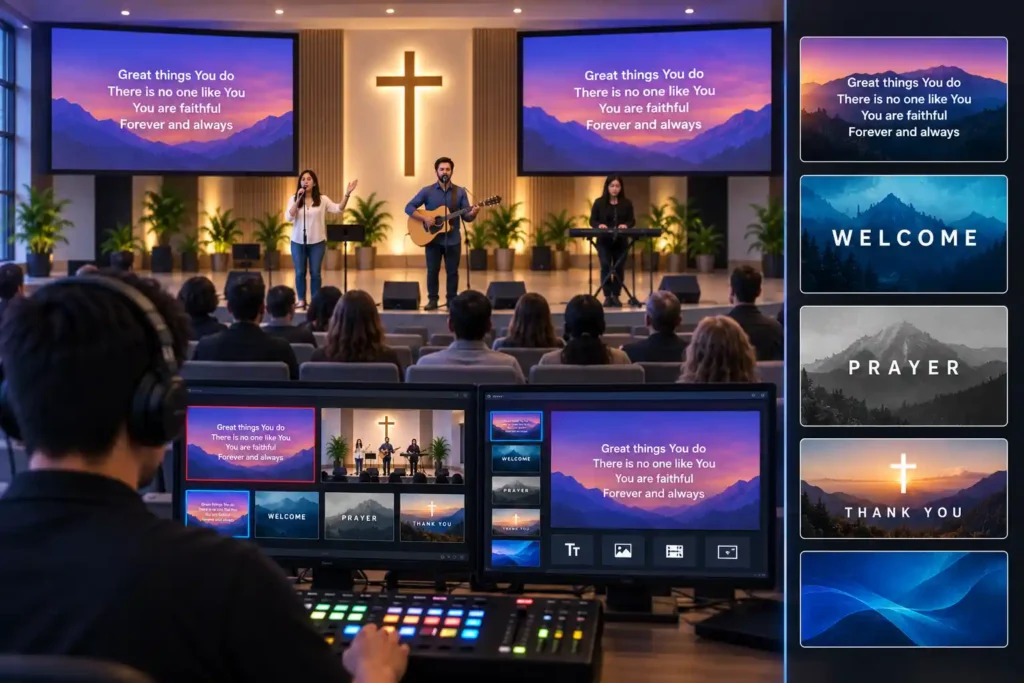
Once picture and sound are working reliably, the next step usually isn’t a third camera — it’s text on screen. Song lyrics and simple graphics, such as a speaker’s name, are one of the most cost-effective ways to improve the viewer’s experience. This article explains why this is worth doing at this particular stage, and how to do it so that the only thing left to decide live is the timing and selection of the text — not inventing its content, order, or appearance mid-broadcast.
A cheap step, a big benefit
A camera or a microphone always costs something, and buying one takes careful thought. Lyrics and basic graphics are a different kind of investment: they’re mostly software work, not new equipment, so the added cost stays small compared to almost any other part of the system. Yet the benefit to the viewer is immediately noticeable. A church member following online can sing along when the lyrics appear on screen in time with the room. A speaker’s name on screen especially helps with a visiting speaker or a new viewer, so no one has to guess who’s talking.
For this reason, this course recommends introducing lyrics and graphics before a third camera or other, more expensive expansions. A third camera improves visual storytelling, but requires new equipment and often a second operator too. Lyrics improve the viewer’s experience directly, along with accessibility, and introducing them barely changes the system’s equipment at all.
Everything prepared in advance — not improvised live
The same idea that runs through this whole course applies here too, perhaps more strongly than anywhere else: the less the operator has to decide mid-broadcast, the steadier the stream feels. For lyrics and graphics, this means one thing especially clearly — text is written and organized in full before the broadcast, not during it.
Typing text live can feel tempting sometimes, because song lyrics are often already familiar, and it feels quick to just type them straight onto the screen as the song goes along. In practice, though, this adds exactly the kind of load the whole system is designed to avoid: the operator would have to watch the picture and sound while typing text at the right pace, all at the same time. A single moment of inattention shows up directly to the viewer as a wrong or late line.
Consider a situation where lyrics are typed directly into the broadcast during worship music, one line at a time as the song progresses. The operator occasionally falls behind, and the congregation has already moved on to the next verse by the time the previous line finally appears on screen. The solution isn’t a faster typist — it’s preparing the entire set of lyrics as a text file before the broadcast, in the order the song follows.
What this needs, conceptually
At a technical level, lyrics and graphics need two things that are worth understanding as concepts before building them.
The first is a dynamic text source — an element added to the broadcast software whose content (for example, a visible line of text) can be changed without rebuilding the whole picture or scene. In practice, this means the operator can switch the visible lyric line with a single action, once the text content has already been written and organized in advance.
The second is a lower third-type graphic element: a text bar placed across the bottom of the picture, usually transparent or semi-transparent, used to show something like a speaker’s name or other short contextual information over the picture without covering the whole screen. The term comes from the element sitting in the bottom third of the frame. Both are built in advance: the content is written, the appearance (font, size, color) is decided once, and during the broadcast the operator only chooses which finished element is visible at any given moment.
Why this works especially well in this architecture
This is one of the key reasons lyrics and graphics fit so naturally into this particular architecture: since the picture is already assembled on a computer running broadcast software, a dynamic text source and a lower third are a natural part of the same whole — they’re added as their own layers over the picture, and their content can be changed just as easily as a camera angle. With a standalone hardware switcher alone, without a computer in the broadcast chain, the same feature would be considerably more limited.
The simplest way to start
It’s not worth introducing everything at once. The simplest and safest way to start is with two elements: the speaker’s name as a lower third, and one lyric line at a time on the same principle. Both are prepared entirely in advance — the speaker’s name is usually known well ahead of Sunday, and the lyrics can be written out in order as soon as the worship set list is known.
Once these two are working reliably over several broadcasts, it’s natural to expand to showing things like announcements or Bible references on the same principle. Short, pre-recorded video clips — greetings or announcements, for example — fit into the same system later on, but building those doesn’t belong in this first stage.
One thing is worth being careful about even before the first broadcast: publicly displaying and sharing song lyrics or sheet music online may require permission or a license related to music copyright, and the practice varies by country and even from one song to another. This isn’t the subject of this article, and no universal rule can be given — it’s worth checking your own country’s and denomination’s practice in advance, rather than sorting it out only after the lyrics have already been in the broadcast.
How to avoid live editing altogether
The practical rule is simple: if you find yourself writing or editing text during the broadcast, the preparation was left incomplete. A working approach is to gather all the necessary text — lyrics in the right order, the speaker’s name, any other text — in one place before the broadcast, and build the finished elements into the broadcast software so the operator only switches between them. The same principle applies to who prepares the text: it’s worth agreeing in advance who is responsible for putting the lyrics together for each Sunday, so the operator receives the finished material well ahead of the broadcast instead of having to assemble it at the last minute.
What to Remember
- Lyrics and basic graphics are worth introducing before a third camera — the cost is small, and the benefit to the viewer is directly noticeable.
- All text and graphics are prepared entirely in advance, not improvised live — this is the whole system’s design principle applied to text.
- This needs two things conceptually: a dynamic text source whose content can be switched from material already written in advance, and a lower-third-type graphic element for contextual information.
- Software-based broadcast systems support this naturally, while a standalone hardware switcher without a computer limits the possibilities considerably.
- The simplest start is two elements — the speaker’s name and one lyric line at a time — with anything else added only once these are working reliably.