
Home / Church Livestreaming / Operator Path
Operator Path · Lesson 12 of 15
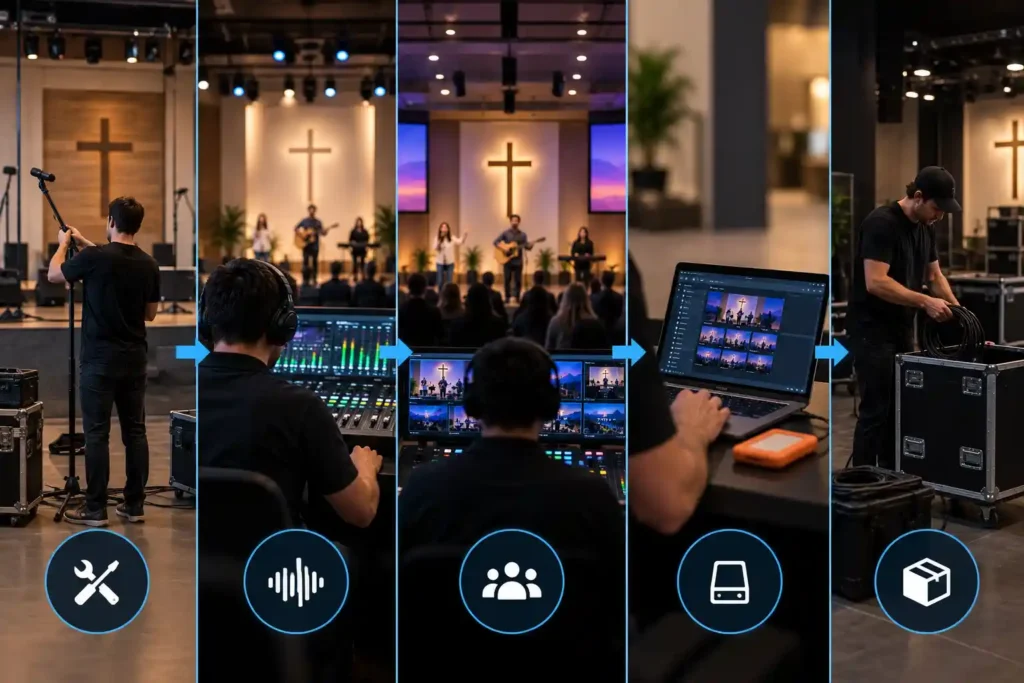
Individual skills — framing a camera shot, routing audio, switching cameras — are easy to learn one at a time. Yet a broadcast succeeds or fails largely based on the order and care with which these skills come together into one routine, every single Sunday. This article describes the whole arc: what the operator does before, during, and after the broadcast, and why this particular order is worth repeating unchanged, week after week.
Arrival and powering up the equipment
This course recommends starting the system up in the same order the signal will later travel: cameras first, then the audio source, and the computer and software last. When a camera is switched on and pointed at the room, it’s worth giving its automatic white balance and focus a moment to settle into the new lighting — this is a quick check lasting a few seconds, not a separate warm-up period. The reason for this startup order is practical: if the computer and software are started first, the capture device may end up looking for a signal that isn’t there yet — a small thing, but one that creates needless doubt at exactly the moment the operator should be able to trust that everything works the same as the previous Sunday.
Once picture and sound are connected and running, the computer is switched on and the software opened last. This is the point where the operator sees, for the first time, what the whole chain looks like as a whole — no longer as individual devices, but as a single picture and sound about to reach the viewers.
Preview and checking before going live
Before anything is sent out, picture and sound are checked in preview — not in program, which the viewer would already see. This distinction matters: preview is the operator’s own space, where noticing a mistake doesn’t show to anyone else. The picture is checked for correct framing and sharpness, the audio is checked on the meter rather than by ear alone, and the stream connection’s stability is confirmed before the event is opened to the audience.
Consider a situation where an operator has grown used to the picture “usually looking fine” and skips the preview check in a hurry. The camera is slightly tilted after last week’s cleaning, and the first ten minutes are streamed to viewers with a crooked shot of the speaker. After an incident like this, checking preview is worth making a rule with no exceptions, rather than a case-by-case choice.
The routine during the broadcast
Once the broadcast is running, the operator’s attention is divided among three things: audio level, picture content, and connection stability. These are watched continuously in the background, but they don’t demand constant action — only readiness to react if one of them departs from what’s normal.
Switching cameras is the only recurring active decision, and even that should stay simple: switch now, or not. During speech, switches happen rarely and only at natural pauses; during worship music, more often, at musical turning points. How two-camera control is built so that the picture itself no longer needs to be thought through live — only its timing — was covered in the previous article, but the principle already shows up here: the less the operator has to invent on the fly, the steadier the broadcast feels to the viewer.
Ending the broadcast and shutting down
The broadcast is ended just as deliberately as it began. The program doesn’t cut off mid-hymn or mid-announcement; instead, the broadcast is given a moment to settle — for example, a few seconds of quiet, wide shot before the stream is stopped. Only after that are the devices switched off, and here too the order is worth reversing from startup: software and computer first, then the audio source, and cameras last. This way, no device is left sending a signal that nothing else is receiving anymore.
Checking afterward
Right after the broadcast, it’s worth setting aside a couple of minutes for a quick check: did the recording save correctly, does the viewer count or feedback look out of the ordinary, and was any device or cable left in an odd position for next time. If anything deviated from normal — even a small audio dropout or a forgotten scene switch — it’s worth writing down right away, while it’s still fresh, rather than waiting until the following Sunday.
Why the routine stays the same every time
This deliberate repetition of the whole arc — the same order, the same checkpoints, the same way of starting and ending — isn’t a way of making things duller. It’s a way of reducing the number of decisions the operator has to make right when attention should be on the content of the broadcast, not its mechanics. When the startup order, checkpoints, and shutdown method are always the same, a deviation is noticed immediately, because it stands out from the familiar pattern. If the routine varied week to week depending on who’s present or how much time there is, every Sunday would require rethinking from scratch — and that increases the likelihood of mistakes rather than reducing it.
This is also why the routine is worth writing down, so that any trained volunteer can follow it alone, without a key person needing to be present to guide every step.
What to Remember
- Power equipment up and down in a consistent order: cameras and audio on first, computer and software last — reverse the order when shutting down.
- Always check picture and audio in preview before going live, not only after viewers are already watching.
- During the broadcast, the operator continuously watches audio, picture, and connection, but active decisions are made rarely and deliberately — especially the timing of camera switches.
- End and shut down the broadcast calmly, not mid-moment.
- The same routine is deliberately repeated unchanged every week, because predictability reduces mistakes and makes deviations easier to notice.