
Home / Church Livestreaming / Start Here
Start Here · Lesson 3 of 4
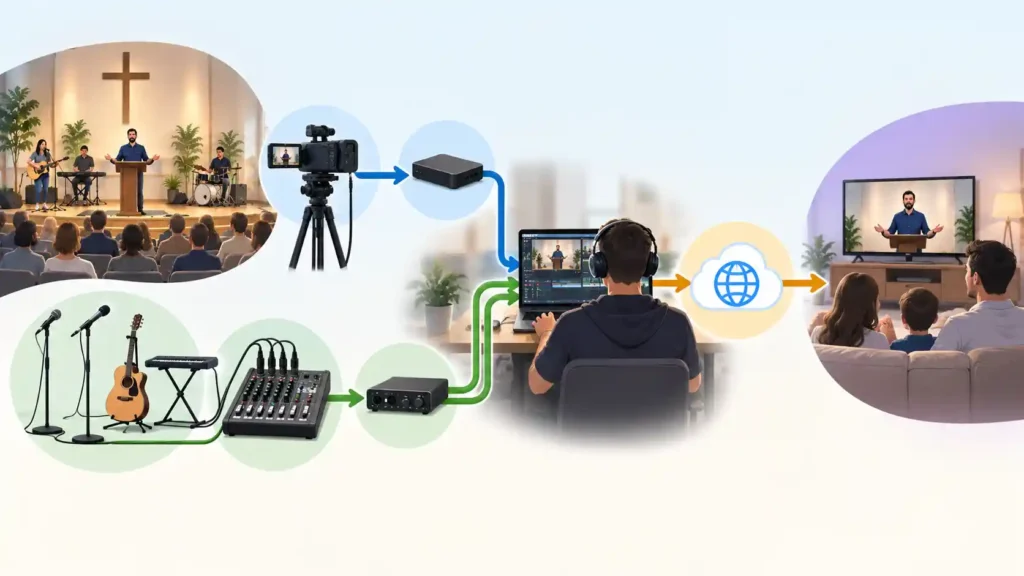
Once it’s clear what a good livestream means for the viewer, the next question is more practical: what parts does the system actually consist of, and why these parts specifically? This article gives an overview of the whole, before you move into your own path — either decisions or hands-on work. Seeing the whole chain at once makes it easier to understand why later choices are made the way they are.
Five Parts, One Chain
A livestreaming system consists of five main parts: the camera, the audio connection, the computer, the production software, and the streaming platform. These are not separate, unrelated purchases — they form a single chain, in which each part does its job and passes the result on to the next. The chain is only ever as reliable as its weakest part — a great camera does not help if the audio does not reach the computer properly, and good audio and picture do not help if the streaming platform cannot get them to the viewer.
The camera produces the picture of the speaker and the room. Its job sounds simple, but it is decisive: to show the viewer the right thing, at the right size, and held steady.
The audio connection brings a signal from the church’s sound system that is suitable for the livestream. This is not the same thing as the sound in the room — the room and the livestream often need a different balance, which is why audio deserves its own, more detailed treatment later.
The computer is the place where picture and audio come together. It is not an extra step in between — it is the part that makes it possible to combine multiple sources, add text or graphics, and control the whole broadcast from one place.
The production software is a program running on the computer that receives the camera and audio, combines them into a single broadcast, and sends it onward. This course uses OBS Studio, because it is widely available, free, and also supports well the text and graphics that are needed later.
The streaming platform is where the viewer gathers — in this course, primarily YouTube. The platform receives the broadcast coming from the computer and distributes it to everyone who wants to watch.
Why Cable, Not Wireless
Each of these five parts has points where the signal could travel either by cable or wirelessly. This course recommends a cabled connection whenever it is practically possible, especially between the camera and the computer. A wireless connection introduces a variable that cannot be fully controlled: it can work perfectly for ten weeks and then drop out unexpectedly during the eleventh Sunday, for no obvious reason. Cable does not remove all risk, but it removes one of the least predictable links in the whole chain.
Consider a situation where a church tries a wireless camera connection to avoid running cable. The picture drops out occasionally, every few weeks, and no cause can be found — until the connection is switched to cable, and the problem disappears completely.
Why the System Is Built in Stages
None of the five parts need to be, or should be, acquired at full scope all at once. In this course, the system is built in levels: first a working foundation, then expansions as need and readiness grow. This is not only a matter of cost — it is also a way to make sure each stage is learned properly before the next one is added.
In practice, this shows up most clearly with the camera: one well-chosen, well-placed camera is enough for a first system. This is not a compromise or a temporary solution meant to be replaced as soon as possible. It is a complete, working system that can serve a church for years as it is. A second camera, room microphones, song lyrics, and graphics only come into the picture once the previous level has become established and the church is ready for the next step.
Consider a church that starts with one camera and initially feels it is lacking, because a neighboring church has two. A year later, the same one-camera system is still working reliably every week, and none of the viewers have ever mentioned it.
Where to Go From Here
This article has given the overall picture — names and roles for the five parts, not yet the details of how each part is chosen or installed. Next comes a closer look at the part most often given too little attention: audio. After that, you choose your own path — either focused on decisions or focused on hands-on work — depending on your role in the church’s livestreaming.
What to Remember
- The system consists of five parts — camera, audio connection, computer, production software, and streaming platform — that work as a single chain, not as separate purchases.
- The chain is only ever as reliable as its weakest part.
- A cabled connection is this course’s recommended starting point over wireless, especially at critical points such as between the camera and the computer.
- The system is built in levels: one camera is enough for a complete, working first system, not a temporary fix.
- Understanding the whole picture in advance makes it easier to see why later, more detailed choices are made the way they are.