
Home / Church Livestreaming / Leader Path
Leader Path · Lesson 1 of 6
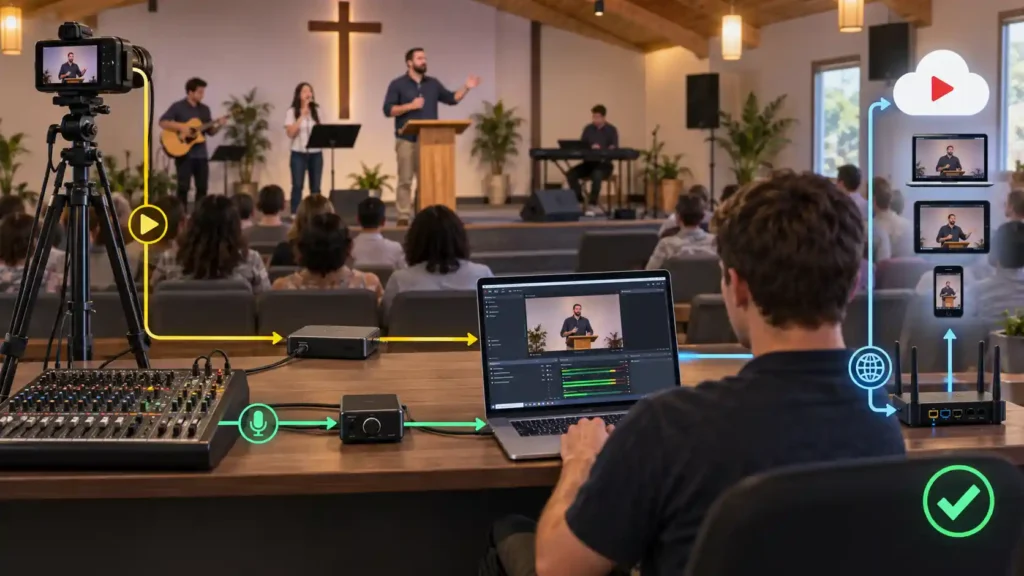
When a church starts planning livestreaming, the treasurer or the church leadership usually asks one question first: how much will this cost? The answer is not a single figure — it is a way of thinking about the purchase. This article does not give euro amounts; those are covered separately, on regularly updated recommendation pages. Instead, it explains the principle the whole budget should be built on.
The system is built in stages, not all at once
The first and most important principle is this: a working livestreaming system is not bought as a single purchase that covers everything at once. It is built step by step, starting from a small, reliable foundation and expanding as need, experience, and budget grow.
It helps to think of this as a series of stages. The first stage produces a working, good-enough livestream. Later stages add capabilities — a second camera, better audio, ready-made graphics — once the previous stage has proven stable in real use. Each stage is a complete, working system in its own right, not an unfinished halfway point. This course calls the first stage the START stage, and the stages that follow it GROW stages — names that also appear later in illustrations and other articles.
This is not just a convenient way to split the cost into smaller pieces. It is also a way of learning. A church that has run a one-camera system for six months understands far better what the next stage actually needs than a church that tries to decide everything in advance, before a single broadcast has happened.
What the first stage conceptually includes
The first stage consists of three components, regardless of exactly which devices are eventually chosen.
First, a camera is needed: fixed in place, producing a stable, correctly framed image of the speaker. Second, a computer is needed, which receives the camera’s picture, combines it with audio, and sends the result on to viewers. Third, an audio connection is needed, bringing understandable sound from the church’s audio system into the same broadcast as the picture.
These three parts are enough for a working, reliable first system. None of them needs to be the most expensive or newest option available — what matters is that each part reliably does its job.
Why "cheapest first" is a risk, not a saving
It is tempting to think that the cheapest available option should be chosen for every part of the first purchase, since the system can always be upgraded later. There is a problem with this reasoning: livestreaming is not a one-time event but a recurring service, run week after week, year after year. A device that cannot handle repeated use, or whose reliability is uncertain, ends up costing more than its purchase price suggests — in repairs, interrupted broadcasts, and volunteer frustration.
Consider a situation where a church has bought the cheapest possible camera and audio interface because the budget was tight. After a few months, the camera starts randomly losing picture mid-broadcast, and the operator has to prepare for this separately every Sunday. Money was saved at the time of purchase, but trust in the system and the volunteers’ enthusiasm for running it suffer continuously.
This is why this course’s recommendation is to reverse that thinking: reliability should matter more than the number of features in the choices made for the first stage. A simple device that works well is a better choice than a versatile device whose operation cannot be fully trusted.
What the cost actually consists of
When church leadership estimates the budget, it is easy to count only the price of the devices. The real cost, however, consists of three parts.
The first is the equipment purchase itself — the camera, the computer, the audio connection, and the accessories they require. The second is installation: the cabling, mounts, and work needed to make the equipment function reliably in place, not just on a test bench. Installation should not be left out of the budget even if the church does it with volunteer labor — poorly done installation shows up later as an unstable picture or recurring faults.
The third part is a maintenance reserve: money set aside in advance for when a part breaks, wears out, or needs replacing after a few years. This part of the budget is often left out entirely, because in the excitement of the first purchase it is hard to think about equipment wearing down. A church that sets this money aside from the start is not caught by surprise when the camera or computer needs servicing or replacing after a few years of use.
Why this article gives no euro amounts
Exact prices and device models change quickly — often faster than training material can be updated. That is why this article focuses on the principle, while up-to-date price and model recommendations are kept separately, on pages updated regularly. This way, the principles remain valid year after year, even as individual devices and prices change.
What to Remember
- The system is built in stages, not all at once — each stage is a complete, working whole in its own right.
- The first stage conceptually consists of three parts: a camera, a computer, and an audio connection.
- “Cheapest first” thinking is a risk: in repeated use, reliability matters more than the number of features.
- Cost consists of three parts — equipment, installation, and a maintenance reserve — and all three should be part of the budget from the start.
- Exact prices and models are kept on separately updated pages, because they change faster than these principles do.